
أسئلة phBot
كل سؤال وإجابته بالصور. نبدأ بالأساس: إزاي تضيف السيرفر، وتظبط المانجر، وتشغّل — والمثال على سيرفر WeldoR.
١محتاج إيه قبل ما تبدأ؟
أربع حاجات بس:
- اللعبة نفسها متسطّبة — فولدر السيرفر اللي فيه Media.pk2.
- phBot — البوت نفسه.
- ProjectHax Manager — المانجر اللي بيشغّل الأكونتات كلها من مكان واحد.
- حساب على ProjectHax فيه اشتراك — ده اللي بتعمل بيه لوجين في البوت.
البوت والمانجر الاتنين بتنزّلهم من موقع projecthax.com.
٢إزاي أضيف السيرفر في phBot؟
ده أول حاجة وبتتعمل مرة واحدة بس لكل سيرفر.
- افتح phBot واعمل لوجين بحساب ProjectHax.
- هتطلعلك رسالة Choose your locale — اختار Private Server.
- هتفتحلك شاشة Edit Private Servers.
أول حاجة اختار فولدر اللعبة من زرار
...جنب Path — البوت بيقرا منه بيانات السيرفر ويملا أغلب الخانات لوحده. - راجع الخانات زي الجدول تحت، واضغط Save / Add.
رسم لشاشة Edit Private Servers بقيم ويلدور الحقيقية
| الخانة | تكتب إيه | ويلدور |
|---|---|---|
| 1القايمة | كل السيرفرات اللي ضفتها. * New = سيرفر جديد. | * New |
| 2Name | أي اسم تختاره — بس افتكره، هتكتبه في المانجر بالحرف. | Weldor |
| 3Division | بيتملا لوحده من فولدر اللعبة. | DIV1 |
| 4Hosts | عنوان الجيتواي والبورت جنبه — بيتملوا لوحدهم. | gw.weldor.online 35779 |
| 5Version | نسخة الكلاينت — بتتملا لوحدها. | 293 |
| 6Servers | اسم السيرفر زي ما بيظهر في شاشة اختيار السيرفر في اللعبة. تكتبه وتضغط A. | Weldor |
| 7Captcha | سيبها فاضية لو السيرفر مالوش كابتشا. | فاضية |
| 8Path | فولدر اللعبة — ابدأ بيه. | فولدر WeldoR |
| 9Type | نوع نسخة السيرفر. أغلب السيرفرات 1.188. | 1.188 (most servers) |
٣عايز أضيف أكتر من سيرفر؟
نفس الخطوات بالظبط، كل سيرفر لوحده.
- افتح Edit Private Servers تاني، ومن القايمة اللي فوق (رقم 1) اختار * New.
- اختار فولدر السيرفر التاني من Path، واكتبله Name مختلف، واضغط Save / Add.
- في المانجر: اعمل جروب لكل سيرفر (الخطوة الجاية) — كده كل أكونت عارف هو تبع أنهي سيرفر.
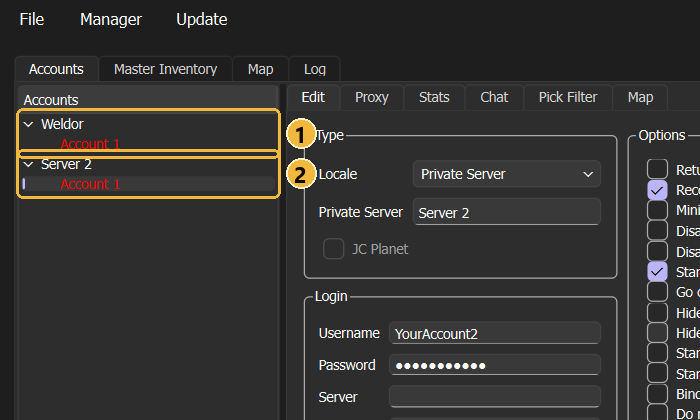
٤إزاي أظبط المانجر؟
المانجر بيفتح البوت واللعبة ويعمل لوجين بالشخصية لوحده — بس محتاج تعرّفه الأكونت مرة واحدة.
- افتح المانجر واضغط
+اللي تحت على الشمال.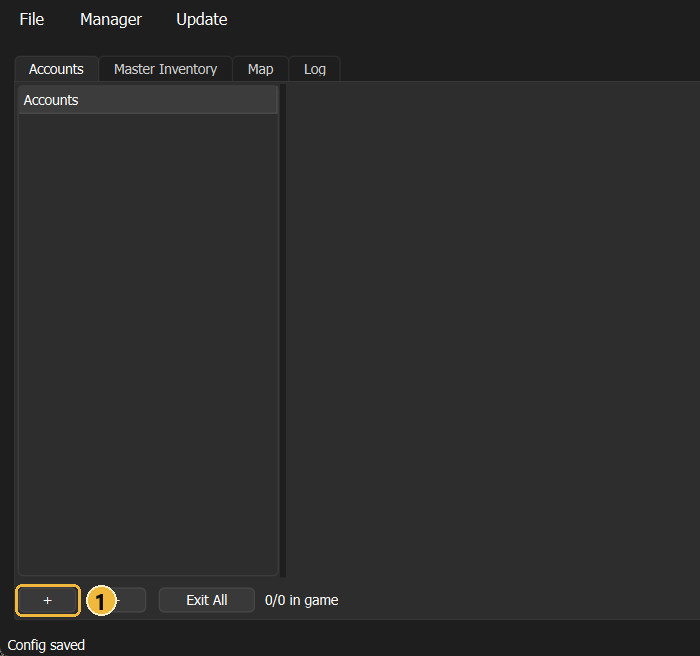
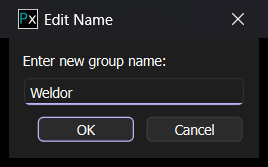
- اكتب اسم الجروب — سمّيه باسم السيرفر
عشان ماتتلخبطش — واضغط OK.
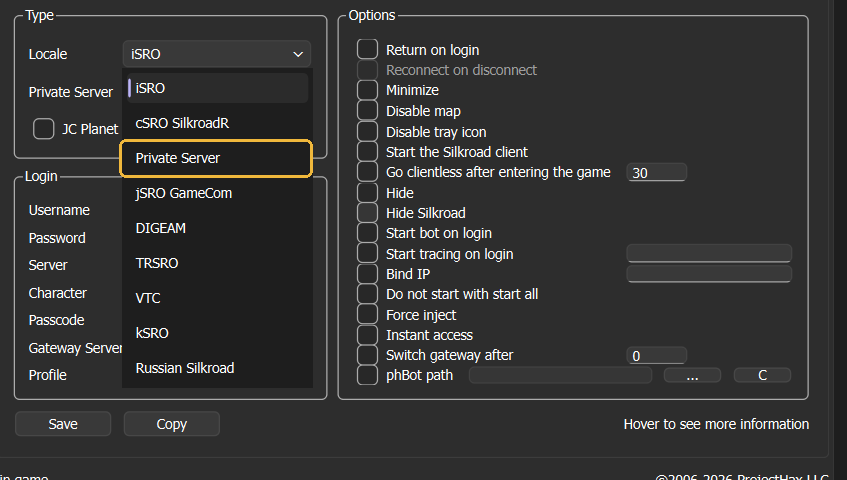
- اختار الجروب، ومن Locale اختار
Private Server.
- املا بيانات الأكونت:
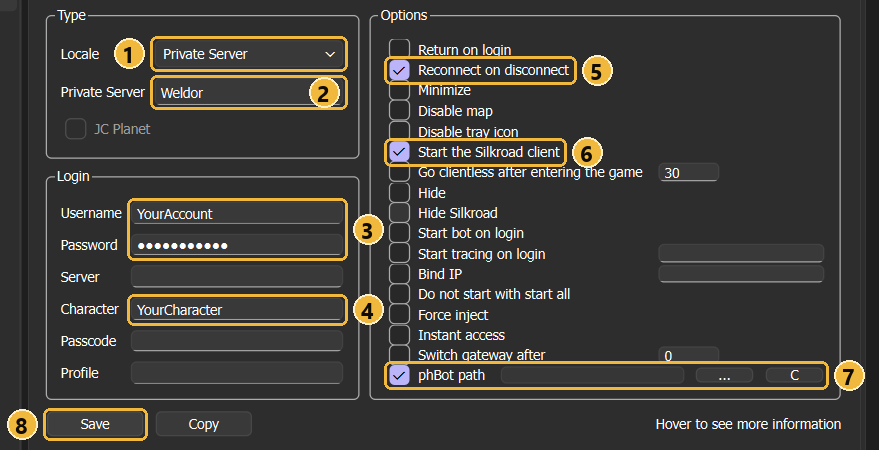
- 1Locale = Private Server.
- 2Private Server =
نفس الـName اللي كتبته في
phBot بالحرف — هنا
Weldor. - 3يوزر وباسورد الأكونت بتاعك في اللعبة.
- 4اسم الشخصية اللي هيدخل بيها.
- 5Reconnect on disconnect — لو النت فصل يدخل تاني لوحده.
- 6Start the Silkroad client — يفتح اللعبة مع البوت.
- 7phBot path — علّم عليها
واختار ملف
phBot.exeمن زرار.... - 8اضغط Save.
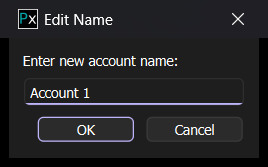
- هيطلب منك اسم للأكونت (ده اسم بيظهر في المانجر بس) —
اكتبه واضغط OK.
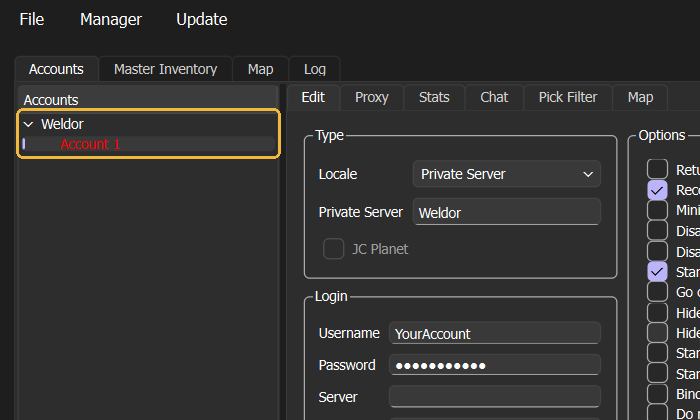
- الأكونت ظهر تحت الجروب. لونه أحمر يعني
لسه مش داخل اللعبة.
٥إزاي أشغّل؟
أكونت واحد، أو كله مرة واحدة.
أكونت واحد
كليك يمين على الأكونت:
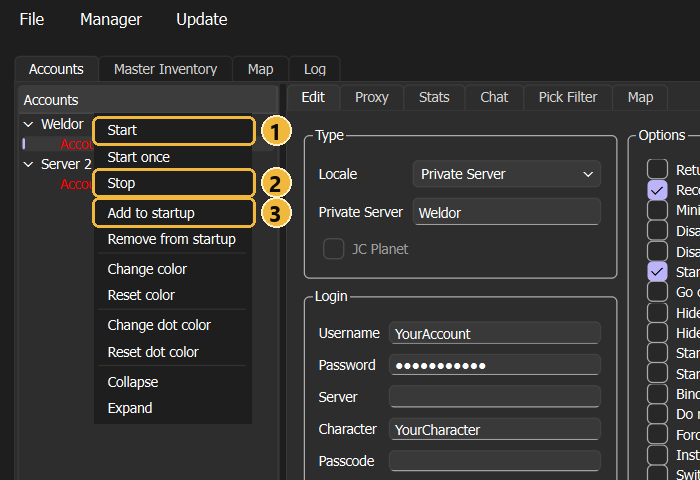
- 1Start — يشغّل الأكونت: يفتح البوت واللعبة ويدخل بالشخصية.
- 2Stop — يوقفه.
- 3Add to startup — يحطه في قايمة الأكونتات اللي بتشتغل أوتوماتيك.
كل الأكونتات مرة واحدة
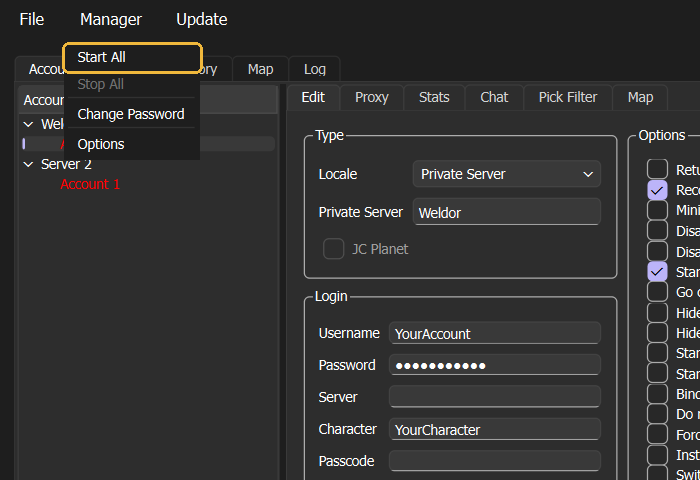
من فوق: Manager ← Start All.
؟أسئلة بتتسأل كتير
المانجر بيفتح البوت بس مش بيدخل السيرفر؟
Weldor غير
weldor.phBot مش راضي يفتح اللعبة؟
أجيب منين أرقام السيرفر لو مااتملتش لوحدها؟
كلها جوّه ملف Media.pk2 بتاع السيرفر:
| الخانة | الملف | ويلدور |
|---|---|---|
| Division + Hosts | DIVISIONINFO.TXT | DIV1 gw.weldor.online |
| البورت | GATEPORT.TXT | 35779 |
| Version | SV.T | 293 |
وأسهل من كده: اسأل في ديسكورد السيرفر نفسه.
أختار إيه في Type؟
أعمل جروب لكل أكونت ولا لكل سيرفر؟
عايز أشغّل أكونتات كتير على جهاز ضعيف؟
ليه اسم الأكونت أحمر؟
phBot FAQ
Every question with its answer and pictures. We start with the basics: adding the server, setting up the Manager and starting — the example uses the server WeldoR.
1What do you need before you start?
Just four things:
- The game itself installed — the server folder that contains Media.pk2.
- phBot — the bot itself.
- ProjectHax Manager — the Manager that runs all your accounts from one place.
- A ProjectHax account with a subscription — that's what you log in to the bot with.
You download both the bot and the Manager from projecthax.com.
2How do I add the server in phBot?
This is the first step and you only do it once per server.
- Open phBot and log in with your ProjectHax.
- You'll get a message Choose your locale — choose Private Server.
- A screen opens: Edit Private Servers.
First, pick the game folder with the
...next to Path — the bot reads the server data from it and fills most fields by itself. - Check the fields against the table below, then press Save / Add.
A drawing of the Edit Private Servers screen with WeldoR's real values
| Field | What to write | WeldoR |
|---|---|---|
| 1The list | All the servers you've added. * New = a new server. | * New |
| 2Name | Any name you like — just remember it, you'll type it in the Manager exactly the same. | Weldor |
| 3Division | Filled automatically from the game folder. | DIV1 |
| 4Hosts | Gateway address and the port next to it — filled automatically. | gw.weldor.online 35779 |
| 5Version | Client version — filled automatically. | 293 |
| 6Servers | The server name as it shows on the game's server selection screen. Type it and press A. | Weldor |
| 7Captcha | Leave it empty if the server has no captcha. | empty |
| 8Path | The game folder — start with it. | folder WeldoR |
| 9Type | The server's version type. Most servers 1.188. | 1.188 (most servers) |
3Want to add more than one server?
Exactly the same steps, each server on its own.
- Open Edit Private Servers again, and from the list at the top (number 1) choose * New.
- Pick the other server's folder with Path, give it a different Name one, and press Save / Add.
- In the Manager: make one group per server (next step) — that way every account knows which server it belongs to.
4How do I set up the Manager?
The Manager opens the bot and the game and logs in with your character by itself — you just need to add the account once.
- Open the Manager and press
+at the bottom left.
- Type the group name — name it after the server so you don't get confused — and press OK.
- Pick the group, and from Locale choose Private Server.
- Fill in the account details:
- 1Locale = Private Server.
- 2Private Server =
the sameName you typed in phBot, exactly — here
Weldor. - 3Your game account username and password.
- 4The name of the character it will log in with.
- 5Reconnect on disconnect — if the connection drops it logs back in by itself.
- 6Start the Silkroad client — opens the game together with the bot.
- 7phBot path — tick it and pick the file
phBot.exewith the.... - 8Press Save.
- It asks for an account name (only shown in the Manager) — type it and press OK.
- The account shows up under the group. Red means it isn't in the game yet.
5How do I start?
One account, or all of them at once.
One account
Right-click the account:
- 1Start — starts the account: opens the bot and the game and logs in with the character.
- 2Stop — stops it.
- 3Add to startup — adds it to the accounts that start automatically.
All accounts at once
from the top: Manager ← Start All.
?Frequently asked questions
The Manager opens the bot but doesn't connect to the server?
Weldor not weldor.phBot won't open the game?
Where do I get the server numbers if they weren't filled?
They're all inside the server's Media.pk2 file:
| Field | File | WeldoR |
|---|---|---|
| Division + Hosts | DIVISIONINFO.TXT | DIV1 gw.weldor.online |
| Port | GATEPORT.TXT | 35779 |
| Version | SV.T | 293 |
Even easier: ask on the server's own Discord.